Getting Started with Burp Suite - Proxy, Site Map, and a Real XSS
My first proper walk through Burp Suite: proxy the browser, build a site map that surfaces a hidden endpoint, set a scope to cut noise, and edit a live request to slip an XSS past a client-side filter.
Burp Suite is the tool that shows up in basically every web app testing job description, so I wanted to actually understand it rather than just poke buttons. This room is mostly setup and navigation, but it ends with something that made the whole point click for me - editing a request mid-flight to get past a filter the site thought was protecting it.
What Burp actually is
Burp sits between your browser and the web server as a proxy. Every request your browser makes stops at Burp first, where you can read it, change it, drop it, or forward it on. That’s the whole idea, and once it clicked, a lot of web testing made more sense: the browser is just a client, and anything the client does can be rewritten before the server ever sees it.
There are three editions. Community is free and manual-only - that’s what this room uses. Professional is paid and adds an automated scanner and unlimited fuzzing. Enterprise runs on a server and scans continuously. The Community tools worth knowing early are Proxy (intercept traffic), Repeater (resend one request with tweaks), and Intruder (spray requests for fuzzing or brute force).
Setting up the proxy
To route browser traffic through Burp, I pointed Firefox at it with the FoxyProxy extension - IP 127.0.0.1, port 8080 - then turned on Intercept in Burp’s Proxy tab.
The one thing that trips you up at first is the two modes:
- Intercept on: each request pauses in Burp until you forward it. If you forget it’s on, the browser just hangs and it looks like the site is broken.
- Intercept off: traffic flows normally but everything still gets logged in HTTP history, so you can go back and inspect it later.
Burp also ships its own pre-configured browser (Open Browser in the Proxy tab), which skips the FoxyProxy step entirely. And for HTTPS sites you have to install Burp’s CA certificate in the browser - Burp swaps in its own certificate to read encrypted traffic, so without trusting it the browser throws certificate errors.
The site map found something I never clicked
The Target tab quietly builds a site map as you browse - a tree of every page you’ve hit. What I didn’t expect is that its passive crawl also reads the HTML and JavaScript of each page and adds any links it finds there, including ones that aren’t visible on the page.
Browsing the target that way turned up an endpoint that didn’t match any of the normal pages - a random path, /5yjR2GLcoGoij2ZK, that only appeared after loading the page that linked to it. It wasn’t in the menu and I’d never have guessed it. That’s the real lesson: the site map surfaces endpoints you’d miss by clicking around, because it reads what the page references, not just what you see.
Scope keeps you sane
Left alone, Burp logs and intercepts everything - including all the background noise your browser makes to other sites. Scope fixes that. You right-click the target and Add to scope, then add the Proxy rule “URL Is in target scope” so interception only pauses your actual target. Small setting, but it’s the difference between a clean workspace and drowning in unrelated requests. I turned this on early and it made everything after it easier to follow.
The part that made it click: XSS through the proxy
The target’s support form had a client-side filter that blocked special characters in the email field. That’s the setup for the whole point of Burp - client-side filters only run in the browser, so they mean nothing once the request leaves it.
The steps were simple:
- Fill the form in with clean data so it passes the browser’s filter (email pentester@example.thm, some normal query text).
- With Intercept on, Burp catches the POST before it’s sent.
- In the paused request, swap the email value for the payload <script>alert(“Succ3ssful XSS”)</script>.
- Select just the payload and press Ctrl+U to URL-encode it so the special characters travel cleanly.
- Forward the request and switch back to the browser.
The server reflected the payload straight back into the page and it executed:
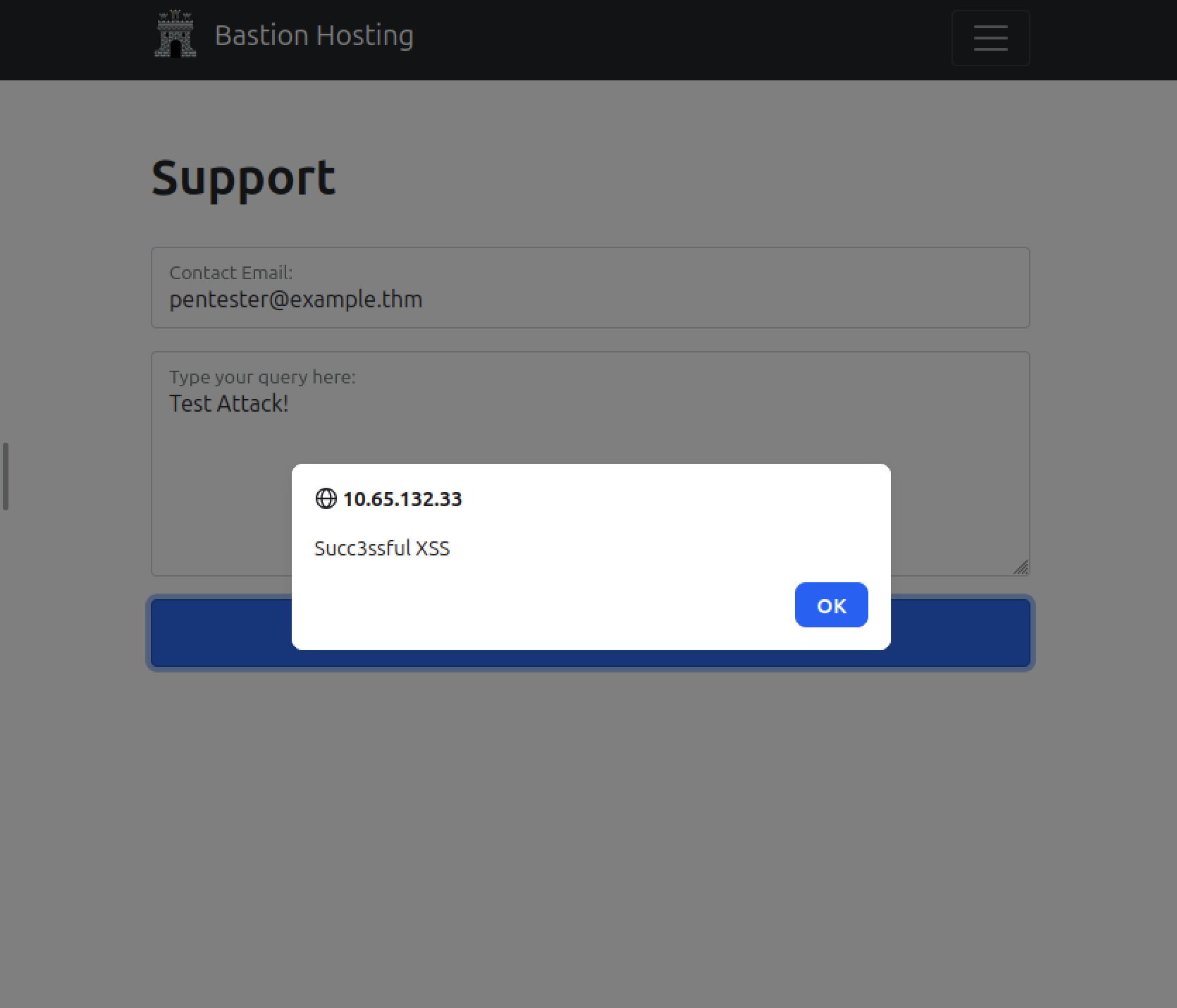
This is reflected XSS - it only affects the person who sends the crafted request, so it’s lower impact than the stored kind. But it proves the input isn’t being sanitized on the server, and it’s a clean demonstration of why “we validate it in the browser” is never a real defense.
What I took away
- Burp’s whole value is that it sits after the browser - so any check the browser enforces can be rewritten before the server sees it.
- Know which Intercept mode you’re in. Half of “why is this broken” moments are just Intercept left on.
- The site map reads code, not just clicks - it finds endpoints hidden in a page’s HTML and JavaScript.
- Set scope early so you’re not fighting through unrelated traffic.
- Client-side validation is a UX feature, not a security control. The real fix for the XSS here is server-side output encoding, so the payload gets rendered as text instead of running as script.