My First SIEM Investigation - What I Learned Working Through BOTSv2 in Splunk
Three days inside the BOTSv2 dataset on TryHackMe's Splunk 2 room. Four scenarios, one fake brewery. Notes on what clicked and what didn't.
Why This Was Hard
Splunk 2 took me three days. It is the longest single lab I have done.
The format is not one box with one entry point. BOTSv2 is a dataset that holds the full telemetry from one bad week at a fictional brewery called Frothly. You play Alice Bluebird, the SOC analyst. There are four independent investigations:
- Insider threat. An employee emailing company documents to a competitor.
- Web attacks. A vulnerability scanner, SQL injection, XSS, and a fake forum account with a misspelled name.
- Ransomware. A Mac that got encrypted, and a USB stick that delivered the malware to a different Mac earlier.
- APT. A North Korean group (Taedonggang) using spear phishing, self-signed HTTPS, registry-stored C2 URLs, and a scheduled task running Base64-encoded PowerShell.
What Splunk Is
Splunk is a database that holds logs. Every record is indexed by sourcetype (the kind of log) and index (the bucket). You query it with SPL (Search Processing Language), which works like Unix pipes. Each operator takes the output of the previous one.
index="botsv2" sourcetype="stream:http"
| stats count by src_ip
| sort -count
Reads as: look at HTTP records in the botsv2 index, group by source IP and count, sort biggest first. That one query finds the noisiest source IP. Which is how you find a vulnerability scanner.
The First Query I Run Now
| metadata type=sourcetypes index=botsv2
| sort -lastTime
This is not a search. It is a menu. It returns every sourcetype in the index. I saw pan:traffic, stream:http, stream:smtp, stream:dns, stream:ftp, stream:tcp, osquery, XmlWinEventLog, WinRegistry, and many more.
I run this on every new index before writing the first search.
The Pivoting Rhythm
Every step in an investigation uses a value from the previous step. Insider threat scenario:
- Query pan:traffic with src_user= to get the user’s IP.
- Query stream:http with that IP to get the sites visited.
- Filter to the suspicious site, list URIs.
- Query stream:smtp with the user’s email to get sender, recipient, subject, attachments.
Things That Clicked
- Curly braces in field names mean multi-value. attach_filename{}, query{}. Emails have multiple attachments, DNS records have multiple answers. Forget the braces, get blank results.
- src_ip is the sender, dest_ip is the receiver. A private IP in dest_ip means NAT: the public-facing server is behind a router that translates the address.
- Private IPs live in three blocks: 10.x.x.x, 172.16.x.x to 172.31.x.x, and 192.168.x.x. Anything else is public.
- Port 80 plus Apache plus a 200 OK means a web server.
- SQL injection looks like normal SQL plus one unusual function. SELECT, FROM, WHERE are normal. UPDATEXML, SLEEP, BENCHMARK, EXTRACTVALUE are the attack.
- XSS requests usually contain both <script> and cookie. That combination has no legitimate use, which makes it a one-line WAF rule.
- Time correlation finds what keyword search misses. When a malware file was written, I narrowed the DNS query log to ten minutes around that timestamp. Without the window I had thousands of irrelevant records.
- Dynamic DNS is a tell. duckdns.org, no-ip.org, hopto.org, ddns.net. Operators use them because they can change the resolved IP at any time. Few businesses use them in production. Alert on DNS queries to them.
Things That Did Not Click For A While
- Base64 is everywhere. Decode it the moment you see it. Twice in the APT scenario the next answer was sitting in a Base64 blob I had already skipped past. CyberChef’s Magic operation handles recursive Base64.
- PowerShell -EncodedCommand is its own pattern. The decoded payload is often half-encoded, with null bytes between characters because PowerShell expects UTF-16 little-endian. The CyberChef recipe that works: From Base64 → Remove null bytes → Extract URLs.
- Korean fonts on Kali do not render by default. A filename in the APT scenario was just boxes until I installed fonts-noto-cjk. If a string is rendering as boxes, the problem is your font.
- TryHackMe’s answer form rejected raw Unicode. I had to run the Korean characters through CyberChef’s Unescape Unicode Characters before pasting.
- VirusTotal exposes document metadata. The Details tab on a submitted Office or PDF shows embedded Author and Last Modified By fields. Real attackers strip these. Lab samples often do not.
Mapping Findings To Frameworks
The end of the lab asks the analyst to translate raw findings into two industry-standard frameworks. Frameworks are how investigations get communicated to leadership and threat-intel partners.
Diamond Model
The Diamond Model has four corners: Adversary, Capability, Infrastructure, Victim. Two axes connect them: the socio-political axis (the why) and the technical axis (the how).
For the Taedonggang APT scenario:
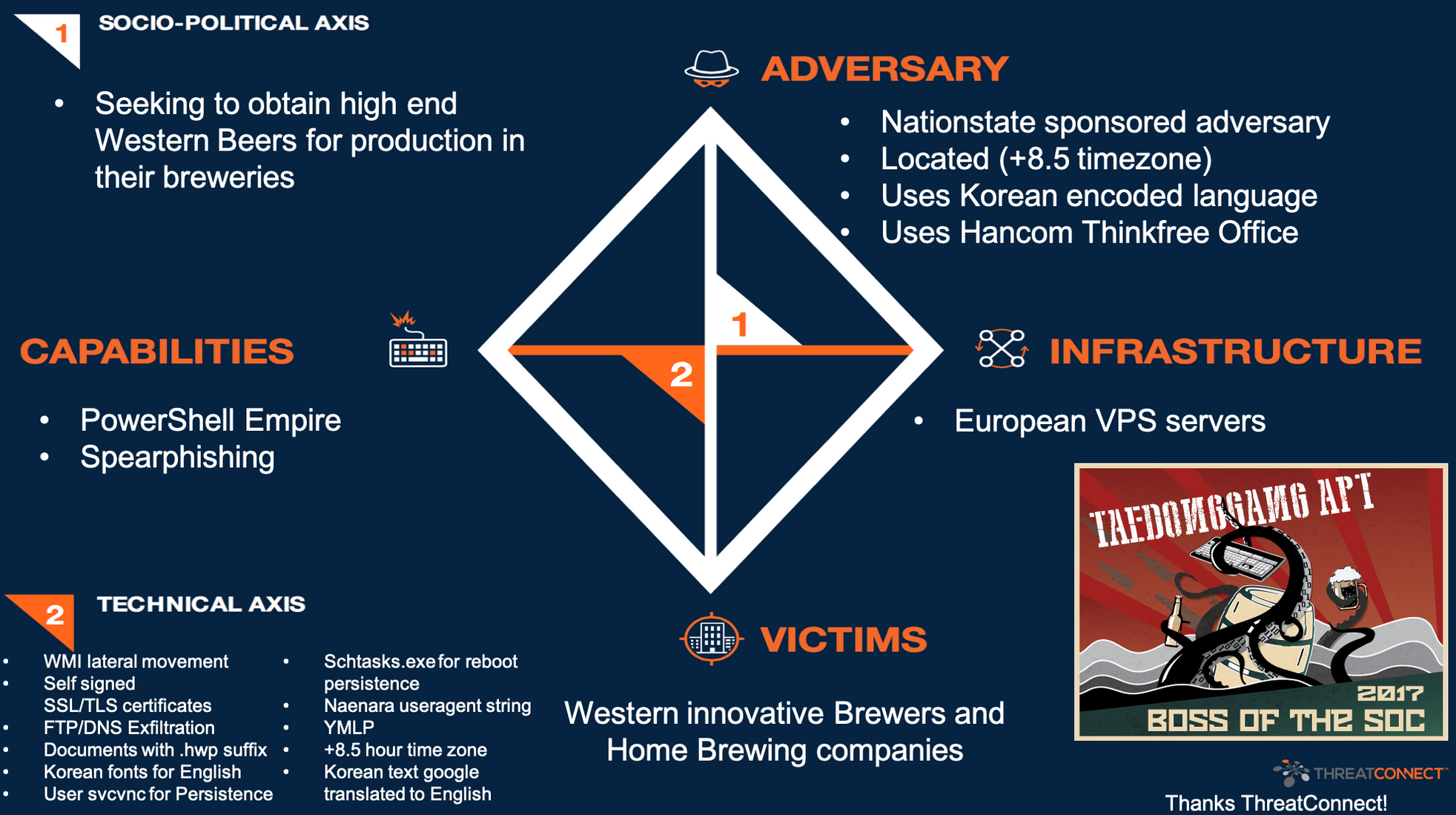
The model forced me out of the SIEM. Questions like who is the adversary and what are they trying to gain are answered with open-source intelligence and threat-intel pivots, not SPL.
MITRE ATT&CK
MITRE ATT&CK is the standard taxonomy of attacker tactics and techniques. Each column is a tactic (Initial Access, Execution, Persistence, etc.). Each cell is a technique.
The room provides a pre-marked matrix showing the techniques the campaign used. Click to enlarge:
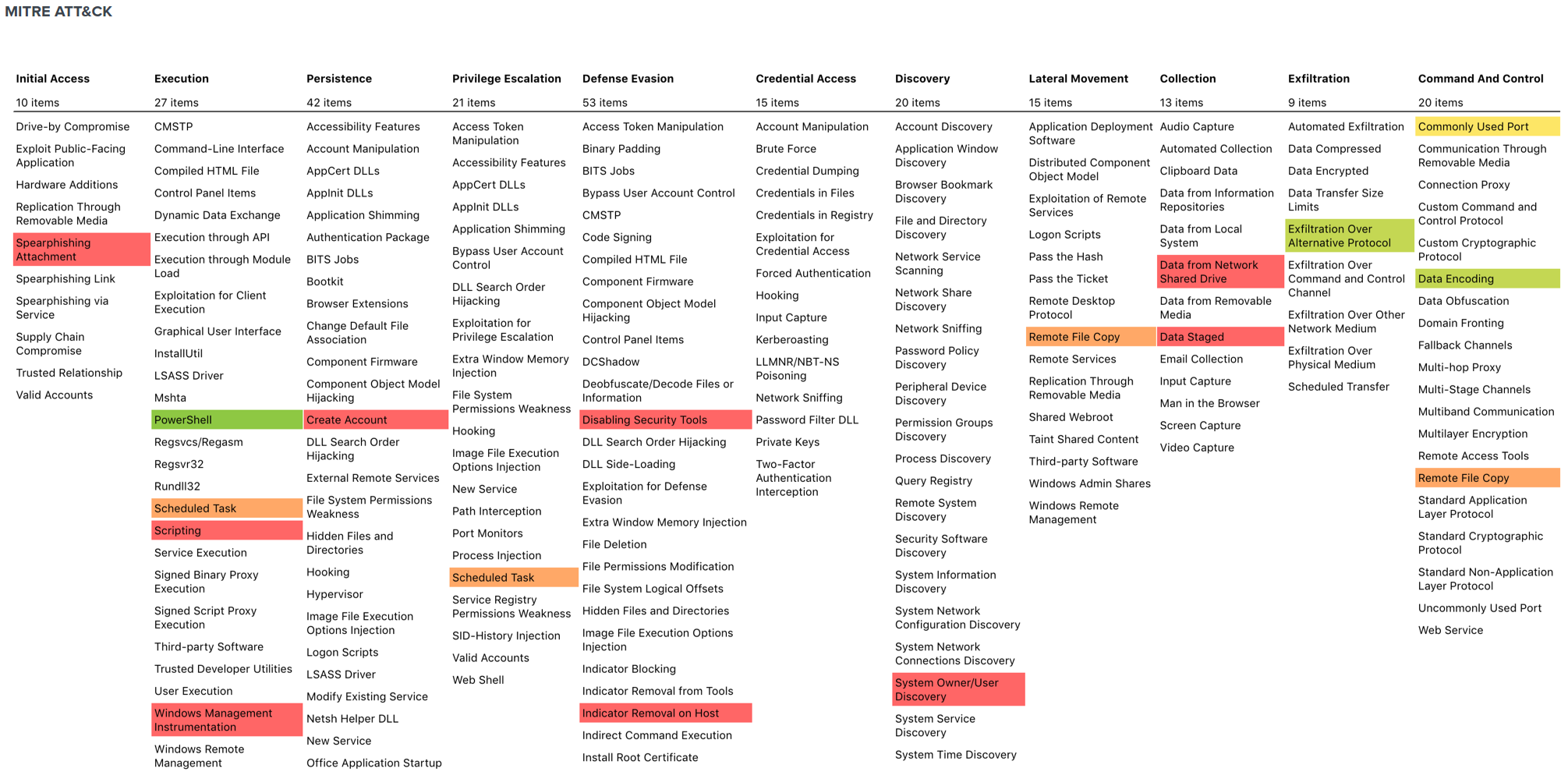
The matrix is dense, so here are the highlighted techniques as a flat list. Each technique ID links to the canonical ATT&CK page:
Initial Access
- T1566.001 Phishing: Spearphishing Attachment
Execution
- T1059.001 Command and Scripting Interpreter: PowerShell
- T1053.005 Scheduled Task/Job: Scheduled Task
Persistence
Defense Evasion
- T1027 Obfuscated Files or Information (Base64-encoded PowerShell)
- T1140 Deobfuscate/Decode Files or Information
- T1112 Modify Registry (C2 config stored in HKLM\Software\Microsoft\Network)
Credential Access
- T1056.001 Input Capture: Keylogging (FruitFly capability)
Discovery
Lateral Movement
Collection
Command and Control
- T1071.001 Application Layer Protocol: Web Protocols (HTTP/HTTPS)
- T1132.001 Data Encoding: Standard Encoding (Base64)
- T1573.002 Encrypted Channel: Asymmetric Cryptography (self-signed TLS)
- T1568.002 Dynamic Resolution: Domain Generation Algorithms / DDNS (duckdns, hopto)
- T1102 Web Service (Pastebin-style storage of C2 metadata)
Exfiltration
Each technique ID points at a known set of detection rules, telemetry sources, and mitigations on the ATT&CK page. A future intrusion with the same technique fingerprint can be flagged as a likely follow-up from the same group.
General Lessons
- Keyword search is the wrong first move. Sourcetype enumeration is the right first move.
- Investigations are chains of pivots, not single queries.
- Time correlation rescues you when keyword search fails.
- Decode encodings immediately. Base64, URL, hex, Unicode.
- Anomaly beats signature for blue team work. The unusual value in a low-cardinality field is the attacker.
- VirusTotal is a pivot tool, not just a sandbox. Hash gives detection names, Details gives author, Relations gives infrastructure.
What I’d Tell A Beginner
- Expect to work for several days depending on experience.
- Run the sourcetype metadata query first.
- Keep a scratch file with every pivot value (username, IP, hostname, email, hash, domain, filename) under per-scenario section headers.
- Install fonts-noto-cjk on Kali before you start.
- Keep a CyberChef tab open.
- Use the official BOTSv2 question list to guide your queries. Do not read other people’s answer walkthroughs.
The technical version with the specific queries and screenshots is in the companion repo on GitHub.